Whether you’re managing private sales, warranties, add-ons, or “free gift with purchase” items, you likely want to keep them tucked away so they aren’t discovered outside of their intended purpose.
The good news? You don’t need a complicated workaround. You can hide these products from every part of your store in just two easy steps.
Step 1: Find your product #
Log in to your admin dashboard and go to the Products section. Search for and select the specific product you want to hide.
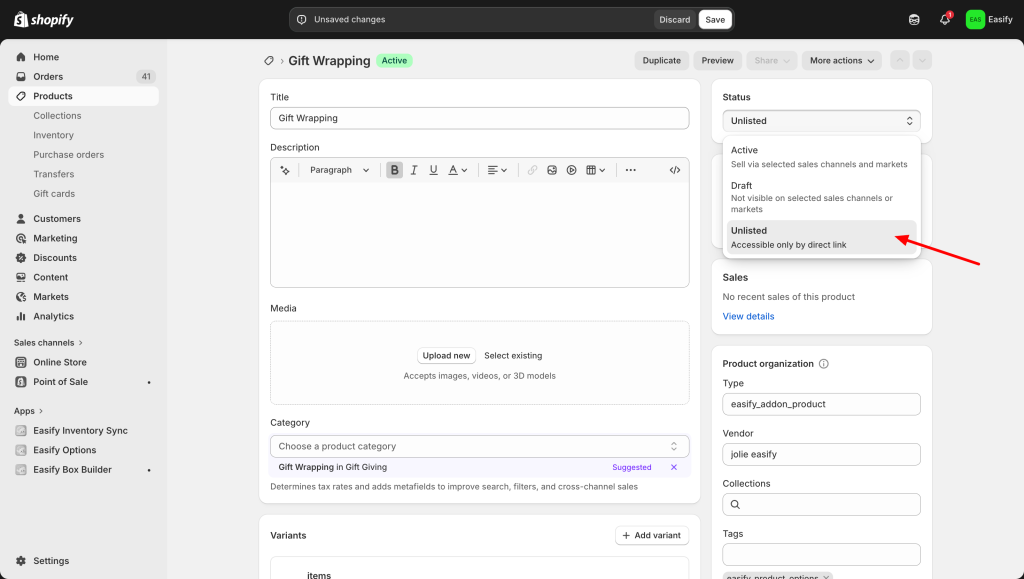
Step 2: Change status to “Unlisted” #
Locate the product status settings and change it to Unlisted.
Step 3: Click Save #
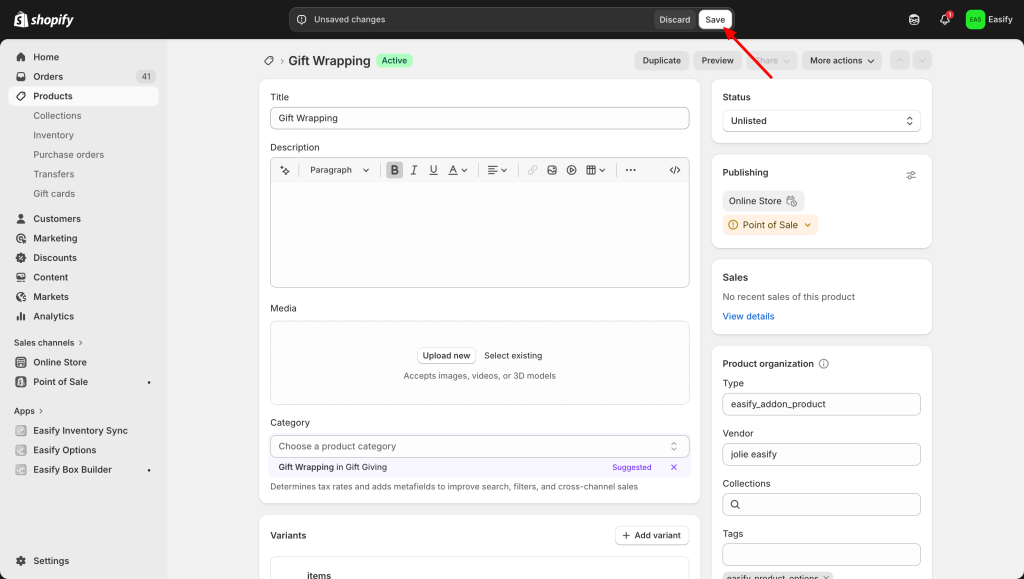
That’s it! Your product is now completely hidden from:
- Store Search & Collections: Customers won’t find it while browsing your site.
- All Sales Channels: It will be removed from all active storefronts.
- Internet Searches: It won’t appear in Google or other search engine results.
This is the perfect way to keep your shop organized while ensuring your specialty items are only used exactly when you want them to be.
Need Assistance? #
If you run into any challenges while hiding your products, feel free to reach out to us for assistance through our convenient in-app live chat We’re here to help!
