Stop digging through Shopify Orders to figure out which custom orders need your attention. Easify Product Options Order Management gives you one workspace to see your custom order workload at a glance, filter down to exactly the orders you need, and pull files and option details without the back-and-forth.
This hub is built specifically for orders that contain Easify options — it’s not meant to replace your Shopify Orders page, just to make working with customized orders faster and less error-prone.
How It Works #
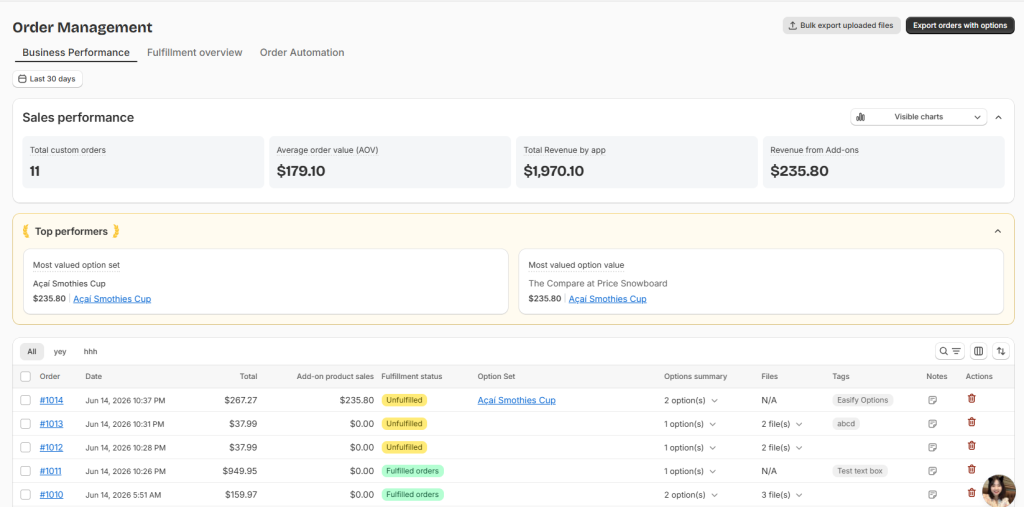
The Order hub is organized into a few areas, each answering a different question:
- Business Performance — how are your custom orders doing overall (revenue, volume, best-selling options)?
- Fulfillment Snapshot — what’s the current workload and what needs to happen next?
- List of Orders — the working table where you scan, filter, and act on individual orders. Covered in separate guides.
- Order Automation (Order Tags and Order Notes) — set up rules that tag and annotate orders automatically. Covered in separate guides.
✨ Plan Availability:
- Business Performance Analytics is available on all plans.
- Fulfillment Snapshot Analytics is available on all plans
- List of Orders requires the Pro plan and above.
- Order Automation, Bulk File Upload Download, and Export Order Files require the Premium plan and above.
Why It Matters? #
✅ See What Needs Attention First Open backlog, overdue orders, and orders you’ve flagged all surface automatically, so you know what to work on before you start scrolling through a long order list.
🛒 Less Back-and-Forth on Production Option details, customer uploads, and notes live right next to each order, so you’re not jumping between Shopify, your inbox, and a spreadsheet just to fulfill one custom item.
🎨 Built for Volume Bulk actions, saved filters, and exports mean a 5-order day and a 500-order day both stay manageable.
What’s Next? #
- Learn more about Business Performance
- Learn more about Fulfillment Snapshot
- Automate your working flow with Order Notes & Tags
