Your box page looks beautiful and works on every device. But there’s one more thing you need to check before sending customers to it: accuracy.
You’ve set up prices, added discounts, and connected your products. But do they all work correctly together? A customer who sees the wrong price or tries to buy an out-of-stock item won’t stick around to figure out why.
🎯 Why this helps you get that first order
Customers need to trust what they see. When prices, discounts, and stock counts are correct, they feel confident clicking through to checkout. One small mistake can cost you that first sale.
So before you share your box page anywhere, take a few minutes to verify everything.
What to check #
Prices – Does the base price match what you set? When you add products, does the total update correctly?
Discounts – Do tiered discounts apply at the right quantities? Does the discount amount show up on the box page and cart?
Stock counts – Do products show as “In stock” when available? What happens when something sells out?
How to check #
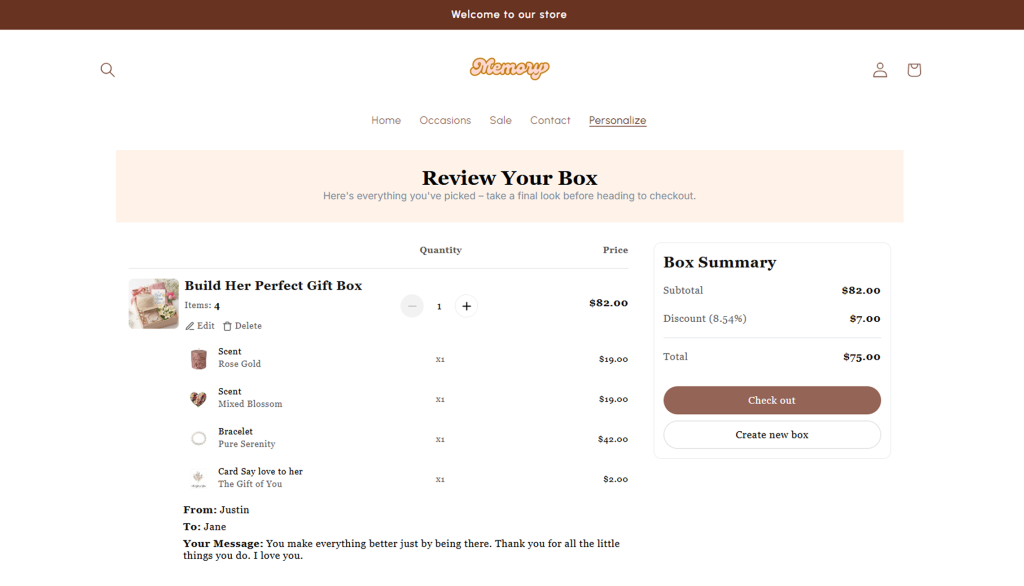
Build a test box from start to finish. Select real products, add custom fields, and apply any discounts. Then compare the price on your box page, cart, and checkout – they should all match.
If something looks off, double-check your settings in the Visual Editor and make sure your Shopify inventory is up to date.
Your box page might be perfect, but don’t forget to test checkout too. Every price and discount has to work there as well. Continue to “Verify Cart & Checkout Accuracy”.
Need assistance? #
If something doesn’t add up and you can’t figure out why, just click the live chat in the bottom-left corner. We’ll help you track down the issue.
