Tiered Quantity Discounts let you reward customers for buying more. Instead of offering one fixed deal, you create multiple tiers: the more items they add, the bigger the savings. This model is perfect for nudging customers toward larger baskets while keeping pricing flexible.
💡 Think of it as “buy more, save more.” Customers feel in control, and you increase average order value.
Common Use Cases #
There are two styles of Tiered Quantity Discounts Box setups:
One-page box: Customers build their box on a single page — quick and straightforward.
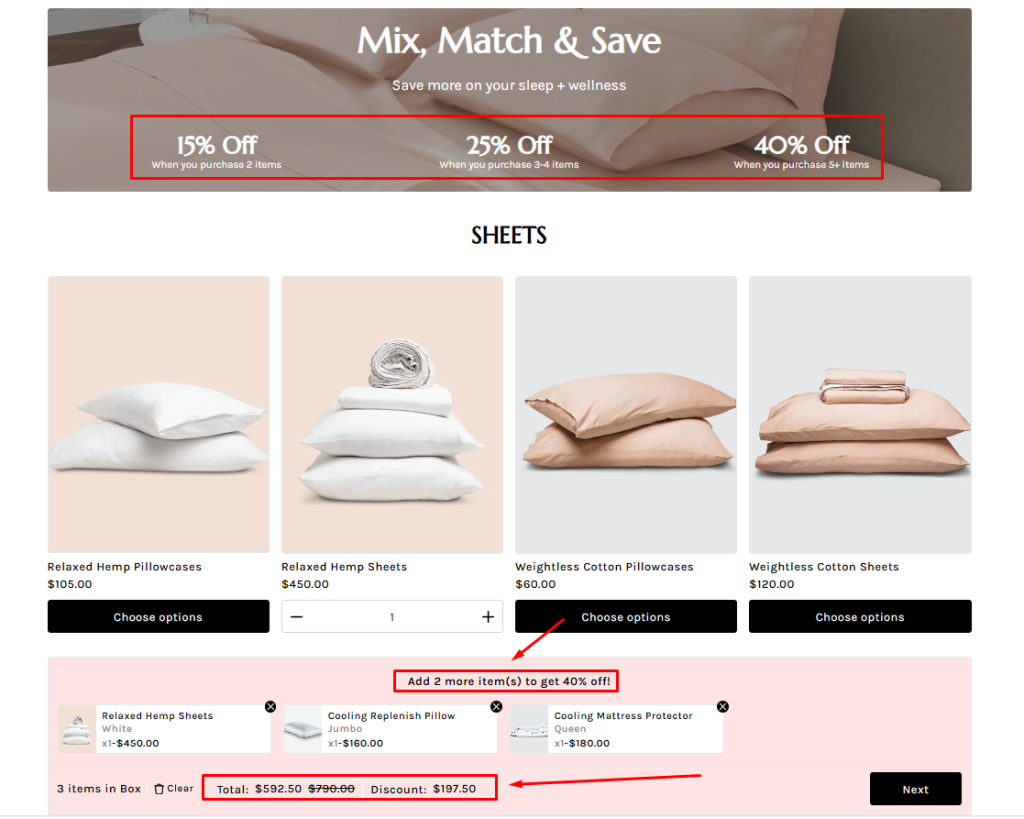
Multi‑page box: Customers move through multiple steps — perfect for larger or more complex bundles.
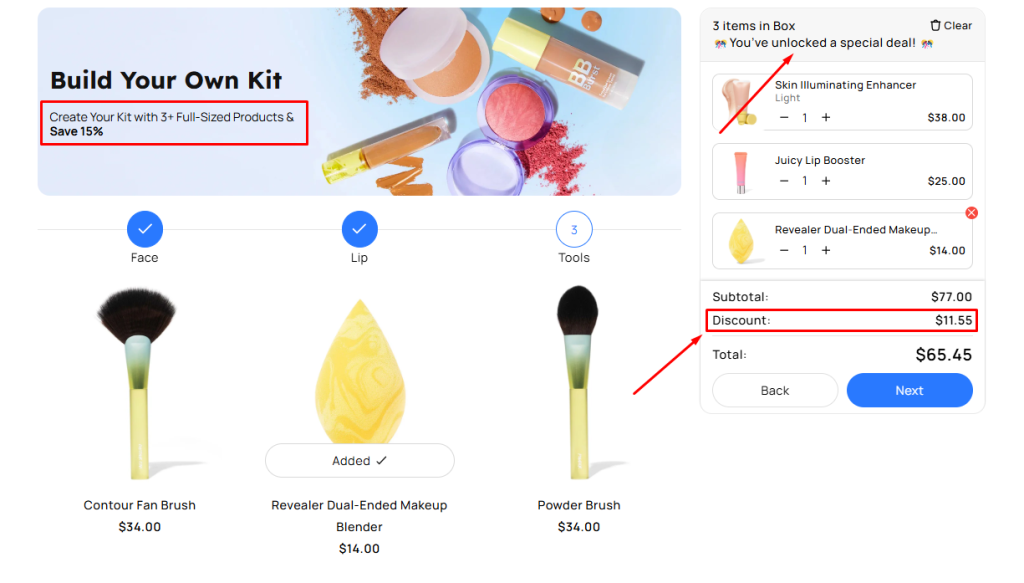
Here are some other demo templates you can explore for inspiration:
One-page Templates
Multi-page Templates
How to Create a Tiered Quantity Discounts Box #
Step 1. Create a New Tiered Quantity Discounts Box #
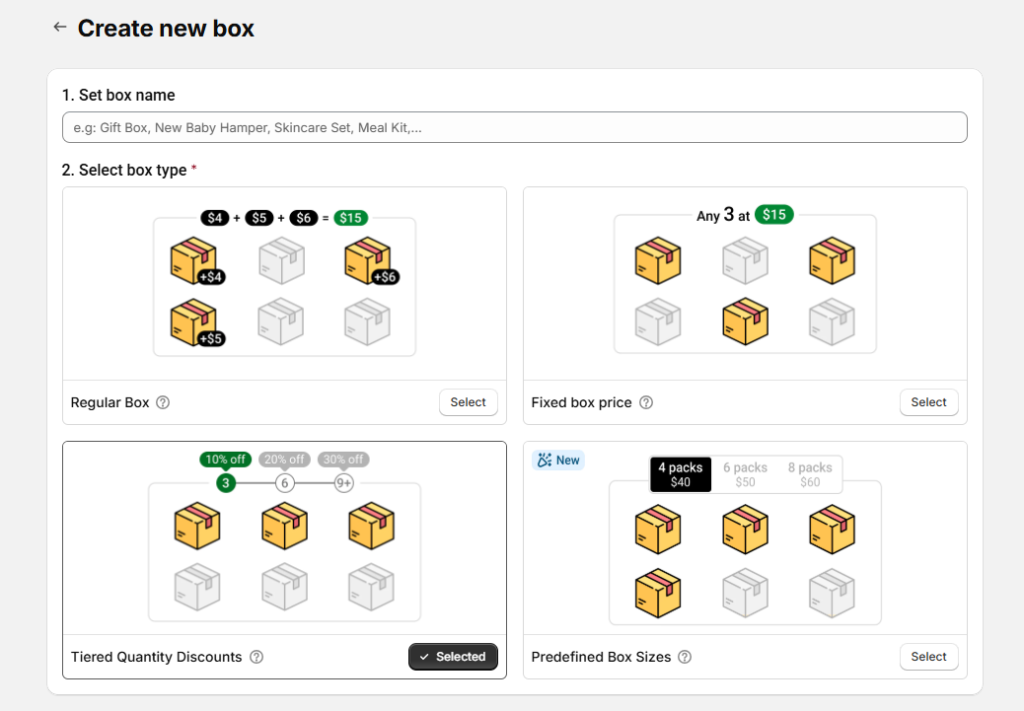
From the Easify Box Builder app admin, go to Box Management → Click the Create box button. Then:
- Enter your box name.
- Select box type: Tiered Quantity Discounts
- Template: Choose a starting point. We recommend using a template.
- Using a Template: Easify offers nearly 30 templates, with 8 specifically designed for Fixed Box Price. This gives you a ready-made structure to customize, saving you time.
- Starting from Scratch: Select this if you prefer to build the box entirely yourself.
After making your selections, click Start building to open the Visual Editor.
Step 2. Configure Tiered Discounts #
In the Visual Editor, open the Discounts tab.
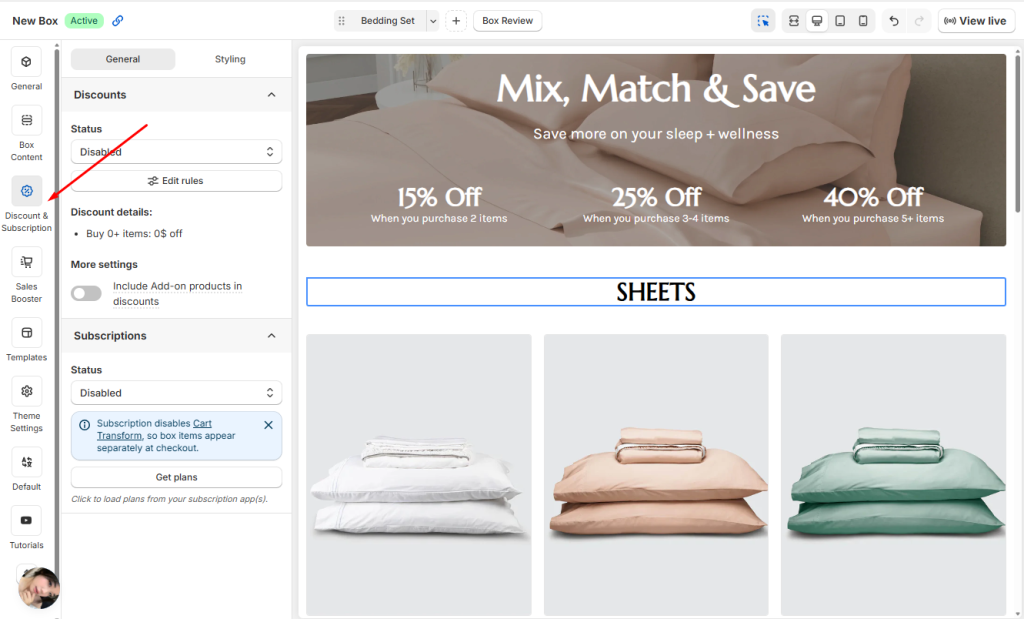
You can change the Status of the Discount from Disabled to Enabled. You can enable it right away or wait until after you’ve configured all your rules.
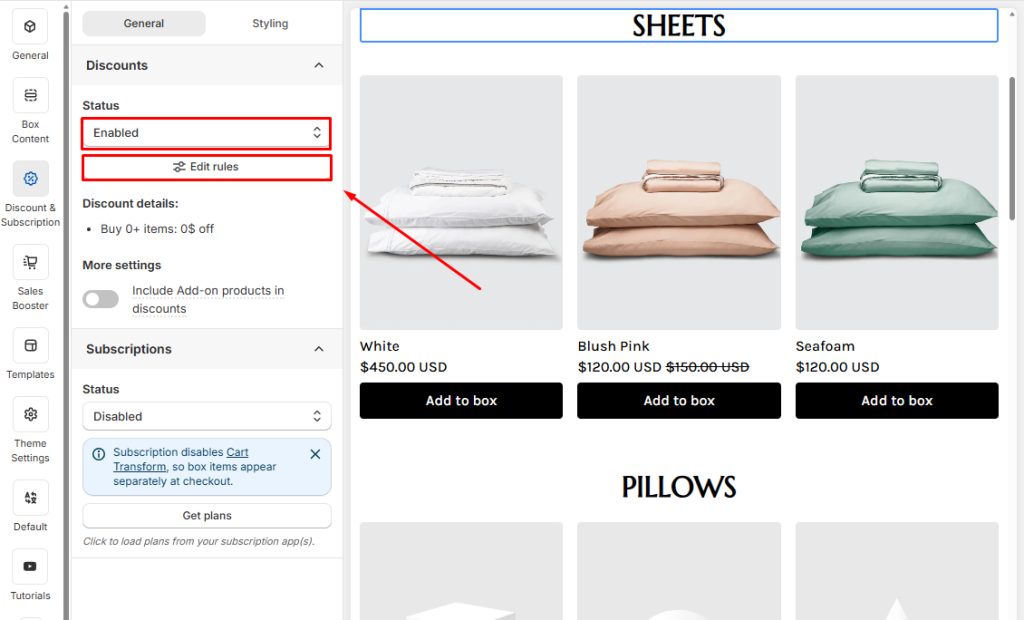
Click Edit Rules to open the discount popup.
- If you want to create multiple tiers (e.g., Buy 2 get 15% off, Buy 3 get 25% off, Buy 5 get 40% off), click Add Tier.
- You can stack as many tiers as you need to guide customers toward larger purchases.
- After adding your tiers, you’ll configure the details for each one individually.
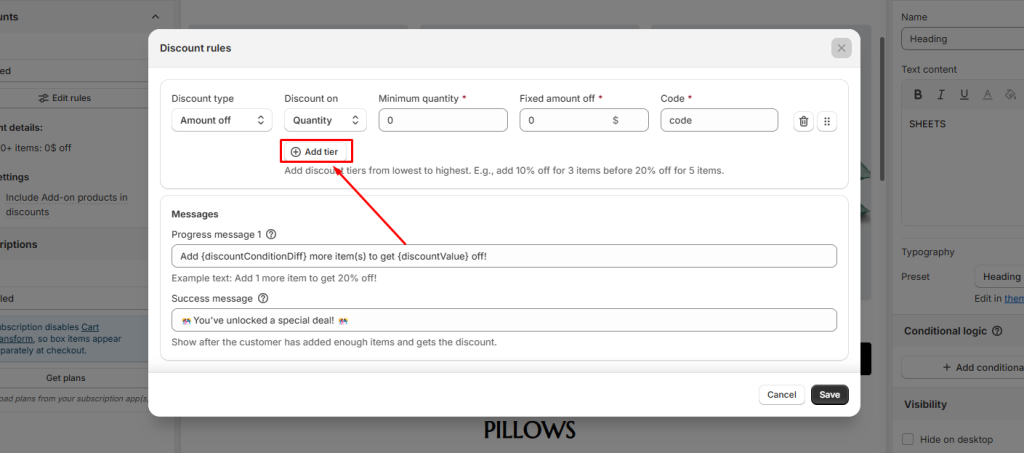
Next, we’ll walk through what each field in a discount tier means so you can set them up correctly.
| Fields | Description |
| Discount type | This determines how the discount is applied. – Amount off: A flat reduction (e.g., Buy 2 get $20 off). – Percentage off: A percentage reduction (e.g., Buy 2 get 20% off). |
| Discount on | This defines what triggers the discount: – Quantity: Based on the number of products purchased in box (e.g., Buy 2 get 20% off) – Amount: Based on the total spend in box (e.g., Spend $100 get 20% off) |
| Minimum quantity / Minimum amount | This sets the threshold customers must reach before the discount applies. – If you selected Discount on Quantity, enter the minimum number of items. – If you selected Discount on Amount, enter the minimum spend. |
| Fixed amount off | Appears only if you chose Amount off – Enter the exact discount value (e.g., $20). – Best for promotions like “Buy 5, Save $20.” |
| Percentage off | Appears only if you chose Percentage off – Enter the discount percentage (e.g., 20%). – Best for promotions like “Buy 3, Save 25%.” |
| Code | This option is for merchants using the old discount flow that created separate discount codes for each box. ⚠️ This flow will be sunset soon — we don’t recommend using it for new setups. |
For example, you can set up tiered discounts for a Bedding Bundle like this:
- Buy 2 get 15% off
- Buy 3 get 25% off
- Buy 5 get 40%
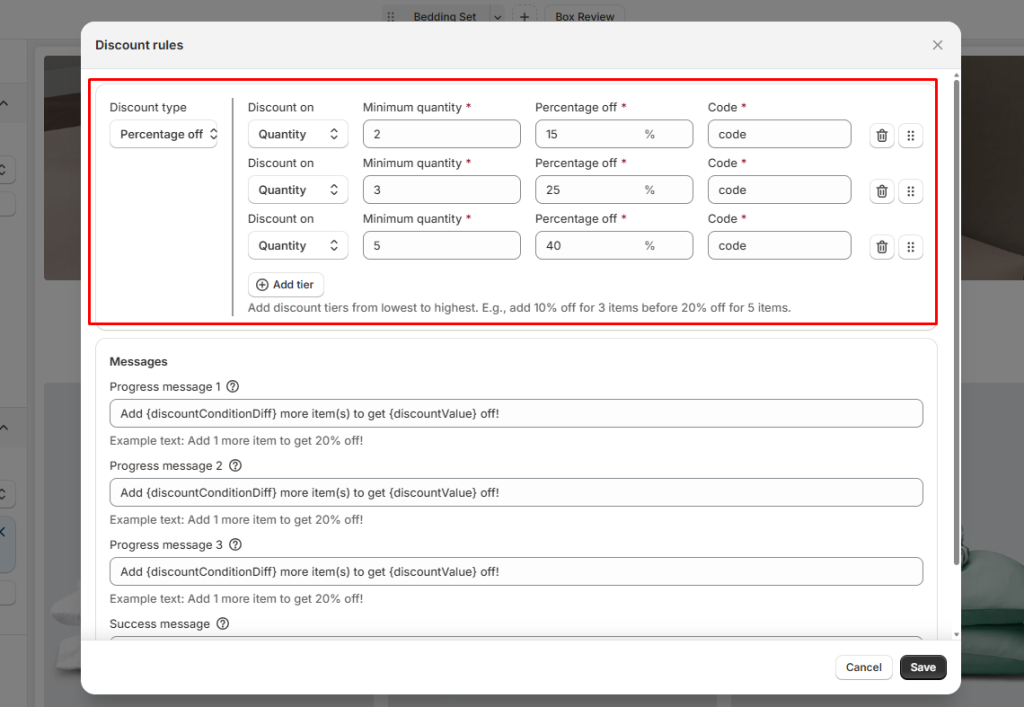
Message
- Progress Message: A motivational message that appears when customers need more items to qualify for the offer (e.g., “Add 3 more product(s) to unlock the deal!”).
- Success Message: The confirmation text shown when the customer has selected the required quantity (e.g., “🎉 Fantastic! You’ve unlocked the special offer! Enjoy your savings!”).
Subscription
If you’re using a subscription app, you can combine it with Tiered Quantity Discounts Box to keep your pricing simple and consistent.
👉 Want to dive deeper? Check out our comprehensive guide to Subscriptions for step‑by‑step instructions and best practices.
Before moving on to the next step, don’t forget to click Save!
Step 3. Customize content in the Visual Editor #
From the left menu, go to Box Content to edit your page.
Add sections and elements (e.g., banners) and assign products to the box.
You can switch between Desktop, Tablet, and Mobile views and customize what appears in each. (This is not just a responsive preview — you decide the actual layout for each device)
Step 4. Refine the design #
From the left menu, go to Theme Settings to adjust page style.
Customize layout width, typography, product cards, step bar, colors, and more to match your store branding.
Step 5. Finalize and publish #
In the General tab, enable the box page.
Save and publish to your storefront.
Define the box page URL.
Add a box image (displayed on the box review page, cart, and checkout).
Advanced Tips to Maximize Profits with Tiered Quantity Discounts #
Highlight the Middle Tier #
Why: In tiered pricing, customers often avoid extremes (“too small” or “too expensive”) and settle on the middle option — a behavior known as the center‑stage effect. Positioning the mid‑tier as the “sweet spot” can drive the majority of sales.
Example: A bedding store offers:
- Buy 2 → 15% off
- Buy 3 → 25% off
- Buy 5 → 40% off
👉 Most customers choose the 3‑item tier because it feels balanced in both price and value.
Keep Tiers Simple (3 is Optimal) #
Why: Too many pricing tiers can overwhelm customers and make decision‑making harder. Research shows that offering around three clear options strikes the right balance — enough variety to feel flexible, but not so many that shoppers get confused or abandon the purchase.
Example: 5‑Tier Setup (Too Complex)
- Buy 2 → 10% off
- Buy 3 → 15% off
- Buy 4 → 20% off
- Buy 5 → 25% off
- Buy 6 → 30% off
👉 While it offers more options, customers may feel confused or indecisive. Too many tiers can cause decision fatigue, leading to slower checkout or even cart abandonment. Instead of encouraging upgrades, it risks overwhelming shoppers.
Show Per‑Unit Savings Clearly #
Why: Shoppers are highly sensitive to “price per unit.” When you make the math obvious, customers feel smarter buying more. Larger tiers become irresistible when savings reach 15–25% compared to the smallest tier.
Example:
- Buy 2 pillows → $10 each
- Buy 3 items → $8 each (20% savings)
- Buy 5 items → $7 each (30% savings)
👉 Add detailed descriptions like “30% off = $7 each items” directly under the tier to make the value crystal clear.
💬 Need Help? #
Questions? Stuck somewhere?
We’re always here to help! Just reach out via our in-app live chat for 24/7 support.
