EasifyApps
  • About
  • Apps
    Easify Product Options
    Easify Product Attachments
  • Resources
    Help Center
    Easify Product Options
    Easify Product Attachments
    Video Tutorials
    Easify Product Options
    Easify Product Attachments
  • Partners
  • Blog
  • Contact
All Easify Apps
EasifyApps
  • About
  • Apps
    Easify Product Options
    Easify Product Attachments
  • Resources
    Help Center
    Easify Product Options
    Easify Product Attachments
    Video Tutorials
    Easify Product Options
    Easify Product Attachments
  • Partners
  • Blog
  • Contact

Easify Product Options App

Getting Started
    Key Terminology Simplified
    • Custom options & variants
    • Option set
    • Option set templates
    • Option type (Option input)
    • Your option sets
    • Option label
    • Option name
    • Option value
    • Option group
    • Conditional logic
    • Live preview
    • Help text
    • Placeholder
    • Information (Tooltip)
    • Option widget
    Option Input Types
    • Design Layer
    • Text Box
    • Text Area
    • Number Text Box
    • Color Swatches
    • Image Swatches
    • Radio Buttons
    • Dropdown
    • Checkbox
    • Button(s)
    • Switch/ Toggle
    • Modal (Popup)
    • File Upload
    • Option Group
    • Product List
    • Date Range
    • Date Picker
    • Time Picker
    • Font Picker
    • Color Picker
    • Dimension
    • Quantity
    • Custom HTML
    • Heading
    • Paragraph
    • Spacer
    • Divider
    App Activation
    • Activate the app on your theme
User Guide (PO)
    Set Up Option Sets
    • Create A New Option Set From Scratch
    • Use Ready-made Templates To Create Your Option Set
    Conditional Logic
    • What is Conditional Logic (CL)?
    • Standard Conditional Logic – Among Easify Options
    • Advanced Conditional Logic – Show Easify Options Based On Shopify Variants
    Extra Pricing (Add Charges)
    • Set Up Extra Fees (Version 3 – From July 24, 2025)
    • Set Up Extra Fees (Version 2 – July 18, 2024 – July 23, 2025)
    • Add-on Prices vs. Add-on Products (Version 1 – Before July 18, 2024)
    • Set Up Add-on Prices (Version 1 – Before July 18, 2024)
    • Set Up Add-on Products (Version 1 – Before July 18, 2024)
    • Convert Add-on Prices To Add-on Products (Version 1 – Before July 18, 2024)
    • Hide Specific Products from Shopify Storefront while Keeping Them Buyable
    Option URL
    • What is Option URL?
    • Establish Cross-Product Links Using Option URL
    • Include Detail Links For Add-on Products/Custom Options
    Option Design
    • Customize Option Styles
    • Distinct Option Styles for Light & Dark Themes
    • Modern and Classic Option Styles
    App Settings
    • General Settings
    • App Translation
    Tiered Wholesale Pricing
    • What is Tiered Wholesale Pricing?
    • Set Up Tiered Wholesale Pricing
    • Customize Tiered Wholesale Pricing Table
    Option Import/Export
      Option Export
      • Export All Option Sets
      • Export Specific Option Sets
    • Option Import
  • Track Real-time Analytics
  • Set Up One-time Charge
  • Set Up Badges for Option Values
  • Set Up Quantity Selector Per Option Value
  • Add Option Value Descriptions & Tooltips
  • Enable Image Editor for File Upload
  • Show Image/ Color Swatch Slider
  • View & Export Orders With Easify Options
  • Hide Main Product Price & Shopify Quantity Selector
  • Display Option Set In Popup Triggered By Button Click
  • Switch Product Images Upon Option Selection
  • Set Up Option/ Option Set Templates
  • Translate Option Set Into Multiple Languages
  • Separate or Combine Add-ons with Main Product in Cart
  • Reposition Option Set On Product Page
  • Set Up Product Bundles
  • Show Custom Options On Order Confirmation Emails (To Customers)
  • Show Custom Options On New Order Notification Emails (To Staff)
  • Show Custom Options On Packing Slips
Product Personalizer (Live Preview)
  • What Is Product Personalizer – Live Preview?
  • How It Works
  • Ready-to-use Templates with Product Personalizer
  • Upcoming Features
Subscription & Billing
  • Pricing Plans
  • How to upgrade
  • How to cancel subscription
Customization & Support
  • App Maintenance Notification
  • Get support
  • Request a new feature
Frequently Asked Questions
  • Why does the app remain “Inactive” even after activation?
  • What to do if custom options aren’t visible on product pages?
  • Why weren’t custom option prices included in my customer orders?
  • How many custom options can I create per product?
  • Does the app work with Shopify Online Store 2.0?
  • Will the app slow down my website?
  • How can I stay informed about updates for the app?
  • What happens if I uninstall the app, and how does it affect my store?
Integrations
  • Easify Product Options x GemPages Landing Page Builder

Easify Box Builder App

Getting Started
  • Activate the App
  • Key Terms
Visual Editor
  • Create a New Box with the Visual Editor (Overview)
  • Create a New Box with a Template
  • Create a Box from Scratch (Without a Template)
  • Create Custom Fields/ Options
Box Types
  • Predefined Box Sizes
  • Tiered Quantity Discounts
Advanced Features
  • Connect Subscription Plans to Boxes
  • Display Variants as Individual Products
  • Create Products Linked with Boxes
  • Set Up Add-on Price or Add-on Product for Custom Fields
  • Translate App Default Texts
  • Translate Box-Specific Content
More Features
  • Use Cart Transform or List Items Separately at Checkout
  • Show Custom Options On Order Confirmation Emails (To Customers)
  • Show Custom Options On New Order Notification Emails (To Staff)
Help & Support
  • Get Support
  • Frequently Asked Questions

Easify Inventory Sync App

  • Welcome to Easify Inventory Sync
Multi-store Sync
    Getting Started
    • Overview and Key Terminology
    Sync Setup & Management
    • How to Connect Source and Destination Stores
    • Understand Connection & Sync Statuses
    • How to Track Sync Activity
    • Disconnect or Delete Connection
    Data Sync Types
    • Product Sync
    • Inventory and Order Sync
    • Page, Blog and Blog postΒ Sync
    Subscription & Billing
    • Pricing Plans
Single-store Sync
    Getting Started
    • Quick Start Guide
    • Frequently Asked Questions
    • Roadmap Spotlight – A Sneak Peek Into The Future
    • Get Support
    Inventory Groups
    • Create Inventory Groups Automatically by SKUs
    • Create Inventory Groups Manually
    • Events Triggering Syncs among Products in Inventory Groups
    • When do Inventory groups Fail to sync?
    • How to Set Up Common Cases
    Bundle Groups
    • Create A New Bundle Group
    • How Master product inventory is Calculated from Component product inventory (Modified Quantity)
    • Events Triggering Syncs among Products in Bundle Groups
    • When do Bundle groups Fail to sync?
    • How to Set Up Common Cases
    Inventory Thresholds
    • What is Inventory Threshold?
    • Set Up Universal Inventory Threshold
    • Create A New Inventory Threshold
    Advanced Features
    • Bulk Edit Inventory Groups
    • Import/ Export Inventory Groups
    • Import/ Export Bundle Groups
    • Export Product Variant & Location IDs
    • Bulk Duplicate Products
    Subscription & Billing
    • Pricing Plans (& FAQs)
    • How to Change Plans
    Common Scenarios & Setup Guides
    • Roast Coffee
    • Loose Leaf Tea
    • Stationery Set
    • Retail & Wholesale Items
    • Blank & Personalized Tees
    • Unisex Tees
    • Baby Gift Hamper
    • Flowers
    • Chocolate Cookies
    • 3-Pack T-Shirts (mixed sizes & colors)
    • Batteries
    • Beverage (Inventory by Cans)
    • Beverage (Inventory by Packs)
    • Multivitamins (from Single Pack)
    • Multivitamins (from Double Pack)
    • Incense Sticks (Inventory by Packs)
    • Incense Sticks (Inventory by Sticks)
    • Candle Trio Set
    • Perfume Set
    • Pick n Mix Sweets
    • Top & Skirt Set (Same Size)
    • Top & Skirt Set (Mixed Sizes)
    • 2-Pack Tops (1 Color)
    • 2-Pack Tops (1 Color) – Only in Packs
    • 2-Pack Tops (Multicolor – Fixed)
    • 2-Pack Tops (Multicolor – Optional)
    • Custom Print Shirts
    • Shoes & Free Socks

Easify Product Attachments App

App Activation
  • Activate the app on your theme
User Guide
  • Upload Product Attachments
  • Upload Attachment Icons
  • Add Attachments To Templates
  • Import Bulk Product Attachments
  • Export Product Attachments
  • Add Attachments To Collapsible Rows On Product Pages
Customization & Support
  • Get support
  • Roadmap Spotlight – A Sneak Peek Into The Future
  • Frequently Asked Questions
  • Feature Requests

Recommended Shopify Apps

  • Page builder
  • Marketing
  • Affiliate programs
  • Image gallery
  • Pricing quotes
  • Invoices and receipts
  • Others

Announcements

  • πŸŽ‰ Easify Lucky Draw 2025: Terms and Conditions
  • Become a VIP Founder of Easify Box Builder – Limited to the First 100 Users Only!
  • Limited Support During Lunar New Year (Jan 25th- Feb 3rd, 2025) – Your Patience Is Our Greatest Gift!
  • Go Beyond Options: Easify Product Options Premium Is Here!
  • Limited Support During Our Summer Holiday (September 27th-29th, 2025) – Your Patience Is Our Greatest Gift!

πŸŽ‰ Easify Lucky Draw 2025: Terms and Conditions

Table of Contents
  • πŸ‘‹ Welcome to Easify Lucky Draw 2025!
  • 🎁 Year-End Gifts (The Fun Part)
  • ⚑ Want to Improve Your Odds? (Optional)
  • 🎯 How Winners Are Selected
  • πŸ“… When Does the Draw Happen?
  • πŸ”’ Your Privacy, Respected
  • πŸ“œ Prize Fulfillment Terms & Conditions
    • 1. Prize Type & Delivery
    • 2. Winner Notification & Claim
    • 3. Eligibility Verification
    • 4. One Prize Per Store
    • 5. Non-Transferable & No Cash Exchange
    • 6. Taxes & Local Obligations
    • 7. Disputes & Final Decisions
    • 8. Right to Modify
  • πŸ’› Why We Do This Every Year
  • πŸš€ Ready to Join?

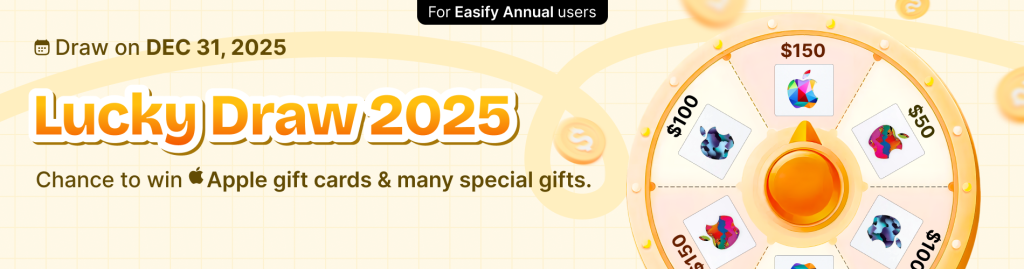
After a full year of building, tweaking, optimizing, and shipping product options side by side, we like to keep one small tradition β€” a simple lucky draw to thank our Easify merchants for growing with us. Whether you’ve been using Easify Product Options for a while or just joined us recently, Easify Lucky Draw 2025 is our year-end celebration. No competitions. No challenges. No pressure. Just a bit of festive luck, a friendly spin of the wheel, and a chance to win something nice before the year ends πŸ€βœ¨

πŸ‘‹ Welcome to Easify Lucky Draw 2025! #

Let’s keep this straightforward.

Easify Lucky Draw 2025 is a year-end lucky draw created exclusively for merchants using Easify Product Options on:

  • Annual Pro
  • Annual Premium
  • Annual Enterprise

If you’re on one of these annual plans, your store name is automatically included in the draw.

No registration.
No extra steps.
No β€œDid I miss something?” moments.

The draw will take place on December 31, 2025, using a digital spinning wheel. The entire process will be recorded to keep things transparent.

🎁 Year-End Gifts (The Fun Part) #

To make the lucky draw a little more exciting, we’ve prepared a prize pool worth $1000+ :

  • πŸ† 1 Γ— $150 Apple Gift Card
  • πŸ₯‡ 1 Γ— $100 Apple Gift Card
  • πŸ₯ˆ 1 Γ— $50 Apple Gift Card
  • πŸ€ 7 Γ— $25 Apple Gift Cards

…and yes, a few fun surprises may be waiting too πŸ˜‰

Each store can win one prize only, so the luck gets shared across the community.

⚑ Want to Improve Your Odds? (Optional) #

Sharing is optional β€” but if you’d like to boost your chances a bit, you can double your entry.

Here’s how it works:

  1. Share your Lucky Draw ticket on any social platform
  2. Add the hashtag #GrowWithEasifyOptions
  3. Make sure the post is publicly visible

Once verified, your store name will appear twice on the spin wheel.

Important (and worth saying clearly):
πŸ‘‰ Double entry means better odds, not a guaranteed win.
The wheel decides β€” not us πŸ˜„

🎯 How Winners Are Selected #

To keep everything fair and drama-free:

  • All eligible store names go into a digital spinning wheel
  • Stores with double entries appear twice
  • The spin is recorded on video
  • Winners are selected purely by chance

The recorded video is the final reference in case of questions or disputes.

If any technical issues happen during the spin, it may be re-run to ensure fairness.

πŸ“… When Does the Draw Happen? #

πŸ—“ December 31, 2025

Winners will:

  • Appear in the recorded spin video
  • Be announced via Easify’s official channels
  • Receive an email with prize details

πŸ”’ Your Privacy, Respected #

We keep data usage simple and limited.

For this lucky draw, we only use:

  • Store name β€” to display entries and announce winners
  • Email address β€” to contact winners and send gift cards
  • Public shared posts β€” only if you choose to share for double entry

No sensitive data.
No selling information.
No unexpected use.

πŸ“œ Prize Fulfillment Terms & Conditions #

(Please read carefully)

To ensure a smooth and fair reward process, the following terms apply to all prizes awarded in Easify Lucky Draw 2025.

1. Prize Type & Delivery #

  • All prizes are digital Apple Gift Cards
  • Prizes are delivered via email to the address associated with the winning store
  • Easify is not responsible for delivery issues caused by incorrect or inactive email addresses

2. Winner Notification & Claim #

  • Winners are notified via email after the draw
  • Winners must confirm acceptance within 14 days
  • If no response is received within this timeframe, the prize may be forfeited or reassigned

3. Eligibility Verification #

Before prize delivery, Easify may verify that:

  • The store was on an eligible Annual plan at the time of the draw
  • The store was active and not suspended
  • Any double entry was earned according to stated rules

If a store is found ineligible, the prize will not be awarded.

4. One Prize Per Store #

  • Each store can receive one prize only
  • If a store appears multiple times during the spin, only the first valid win applies

5. Non-Transferable & No Cash Exchange #

  • Prizes are non-transferable
  • Prizes cannot be exchanged for cash, store credit, or alternative rewards

6. Taxes & Local Obligations #

  • Any taxes or fees related to prize redemption (if applicable) are the responsibility of the winner
  • Easify does not provide tax advice

7. Disputes & Final Decisions #

  • The recorded spin video is the official reference
  • Easify reserves the right to take corrective action in case of technical errors
  • All decisions regarding prize distribution are final and binding

8. Right to Modify #

Easify reserves the right to modify or cancel prize fulfillment in cases of fraud, abuse, or operational necessity.

πŸ’› Why We Do This Every Year #

Easify is built on a simple belief:

Great tools grow stronger with merchants who stick around.

This lucky draw isn’t about marketing tricks or gamification.
It’s just our way of saying thank you to merchants who trust Easify Product Options to help them:

  • build flexible product options
  • offer better personalization
  • improve conversion on their product pages

Your feedback and long-term support shape everything we build.

πŸš€ Ready to Join? #

If you’re already on an Annual Pro, Premium, or Enterprise plan, you’re in πŸŽ‰
Grab your ticket, share it if you’d like to boost your chances, and join us for a simple year-end lucky draw.

Thanks for growing with Easify β€” and good luck πŸ€

Table of Contents
  • πŸ‘‹ Welcome to Easify Lucky Draw 2025!
  • 🎁 Year-End Gifts (The Fun Part)
  • ⚑ Want to Improve Your Odds? (Optional)
  • 🎯 How Winners Are Selected
  • πŸ“… When Does the Draw Happen?
  • πŸ”’ Your Privacy, Respected
  • πŸ“œ Prize Fulfillment Terms & Conditions
    • 1. Prize Type & Delivery
    • 2. Winner Notification & Claim
    • 3. Eligibility Verification
    • 4. One Prize Per Store
    • 5. Non-Transferable & No Cash Exchange
    • 6. Taxes & Local Obligations
    • 7. Disputes & Final Decisions
    • 8. Right to Modify
  • πŸ’› Why We Do This Every Year
  • πŸš€ Ready to Join?
Essentials Logo

Make the Complex Simple for Shopify Stores

Our AppsHelp CenterPartner ProgramPrivacy PolicyTerms of ServiceBlogContact Us

Copyright Β© 2025 Easify. All rights reserved.

Close
Search

Hit enter to search or ESC to close

cookie By using this website, you agree to our cookie policy. Close